The Itch
It started with a simple frustration: I wanted to access my own Reminders programmatically… and maybe my clipboard.
Apple’s Reminders app is great and I use it. But if you want to interact with your reminders from, say, a home server or an automation script? Apple says no. There’s no public API. The old CalDAV approach broke with iOS 13. Your data, their rules.
We’ll see about that.
The Maze
What I thought would be “just find the magic API endpoint” turned into a journey through these nine layers of Apple’s web authentication stack:
Layer 1: Apple ID (idmsa.apple.com)
Layer 2: Two-Factor Authentication
Layer 3: Session Trust
Layer 4: iCloud Services (setup.icloud.com)
Layer 5: App-Specific Passwords
Layer 6: CloudKit Containers
Layer 7: Anisette Data
Layer 8: GrandSlam (GSA)
Layer 9: Protected CloudKit Services (PCS)
Each layer exists for a reason. Each layer has its own auth tokens, its own endpoints, its own gotchas. Apple built this maze intentionally, not to be mean, but because security is hard and they take it seriously.
But I had this hypothesis: somewhere in this maze, there’s a door to my own data that I’m allowed to open. I just need to find it…
What I Found
The Service Map
Apple’s iCloud isn’t one service. It’s dozens, running on different subdomains, using different auth models:
| Service | What It Does | Accessible? |
|---|---|---|
setup.icloud.com | Account config, device list | ✅ Yes (200) |
ckdatabasews.icloud.com | CloudKit (modern data sync) | ✅ Partially (200/400) |
caldav.icloud.com | Calendar (old standard) | ✅ Yes (200) |
gateway.icloud.com | Real-time relay | ❌ Blocked (403) |
mccgateway.icloud.com | Continuity controller | ❌ 503 ;-; |
keyvalueservice.icloud.com | Key-value sync | ❌ Wrong format (400) |
The pattern: 400 means it exists but wants something specific. 404 means it doesn’t exist. 401 means wrong auth. 503 means it’s not for you.
We like 400s. They’re breadcrumbs :]
The PCS Token System
Apple gates CloudKit containers with “PCS tokens” - Protected CloudKit Services. When you authenticate via web, you get tokens for:
- Photos
- Notes
- Documents
- Safari
But NOT for:
- Continuity :(
- Clipboard :((
- Handoff :(((
Why? Because Apple considers those “device features,” not “web features.” The web is objectively untrustworthy and cannot be 100% secure. Your device running their software is trusted. The distinction is architectural, not accidental.
The Reminders Breakthrough
Reminders live in CloudKit under the com.apple.reminders container. I could read them. But the titles were… encrypted? Sort of.
TitleDocument: "H4sIAAAAAAAAA6tWKkktLlGyUlAqS8wpTgUA..."Base64, okayy. Decode it… gzip compressed. Decompress it… binary gibberish with readable text scattered through it.
Ok, protobuf. Apple’s custom protobuf structure for rich text.
I reverse-engineered it:
def decode_title(encrypted_b64):
    decoded = base64.b64decode(encrypted_b64)
    decompressed = gzip.decompress(decoded)
    # The title is buried in a nested protobuf structure
    text_parts = re.findall(b'[\x20-\x7e]{4,}', decompressed)
    return text_parts[0].decode('utf-8')
Then I reversed it again and figured out how to ENCODE titles so I could CREATE reminders:
def encode_title(title: str) -> str:
    # Build the protobuf structure Apple expects
    # Field 2 > Field 3 > Field 2 = actual title text
    # Plus formatting metadata, length markers, etc.
    ...
    return base64.b64encode(gzip.compress(proto_bytes)).decode()
Result: Full CRUD on iOS Reminders from a Python script. :D
To my knowledge, this is not documented anywhere.
Going Deeper: GrandSlam
Web auth gets you far. But some services need more. They need you to prove you’re a real Apple device.
Meet GrandSlam (GSA) — Apple’s device-level authentication protocol:
- Client sends SRP init (username, crypto parameters)
- Server sends challenge (salt, iterations)
- Client computes proof using PBKDF2 of password
- Server validates, returns encrypted session data
- Client decrypts with SRP session key
I got it working. The decrypted “SPD” (Server Provided Data) contains:
- Your Apple Directory Services ID
- Identity tokens
- Service-specific tokens
- Account metadata
But then: 2FA. Apple sends a code to your trusted devices. Fair enough, that’s the security model working as intended.
Anisette: The Device Fingerprint
GSA requests require “anisette headers” - cryptographic proof that you’re a real device:
X-Apple-I-MD: <one-time password>
X-Apple-I-MD-M: <machine identifier>
These are generated by Apple’s binary on real devices. But there’s a public provisioning server (SideStore uses it for sideloading) that can generate valid anisette data.
With fresh anisette + GSA auth + 2FA, I had device-level tokens. I’m a real device, dad!
The Push Notification Rabbit Hole
Apple Push Notification Service (APNs) is how Apple devices get real-time updates. Find My location pings, iMessage delivery, all of it flows through APNs.
I connected to production APNs. Got push certificates. Minted scoped tokens for Find My topics.
Courier: 11-courier.push.apple.com
Certificate CN: 4593BE06-CC07-4B05-9E2C-32F56301B8E7
I was talking to the same servers that ping your iPhone when someone shares their location.
But to RECEIVE notifications for my account, I’d need to register my push token with IDS (Identity Services). That requires “validation data”… a binary blob proving you’re on real Apple hardware.
That’s where I hit the wall.
The Actual Wall: Layer 9
Protected CloudKit Services (PCS) is the final boss. This is where your truly sensitive data lives:
- Health data
- Keychain
- Messages
- End-to-end encrypted notes
This layer requires:
- Device registration with validation data
- Key derivation from your password
- Device-to-device key sync via iCloud Keychain
The validation data is generated by a heavily obfuscated Apple binary. Some projects emulate it using Unicorn Engine. It’s possible, but it’s a different level of effort.
I looked at the door. I understood what was behind it, and chose not to pick that lock.
Continuity Revelations
My original goal was Universal Clipboard. Imagine this: copy on your phone, paste on your laptop, but across the internet :O
After mapping the entire architecture, I learned something important:
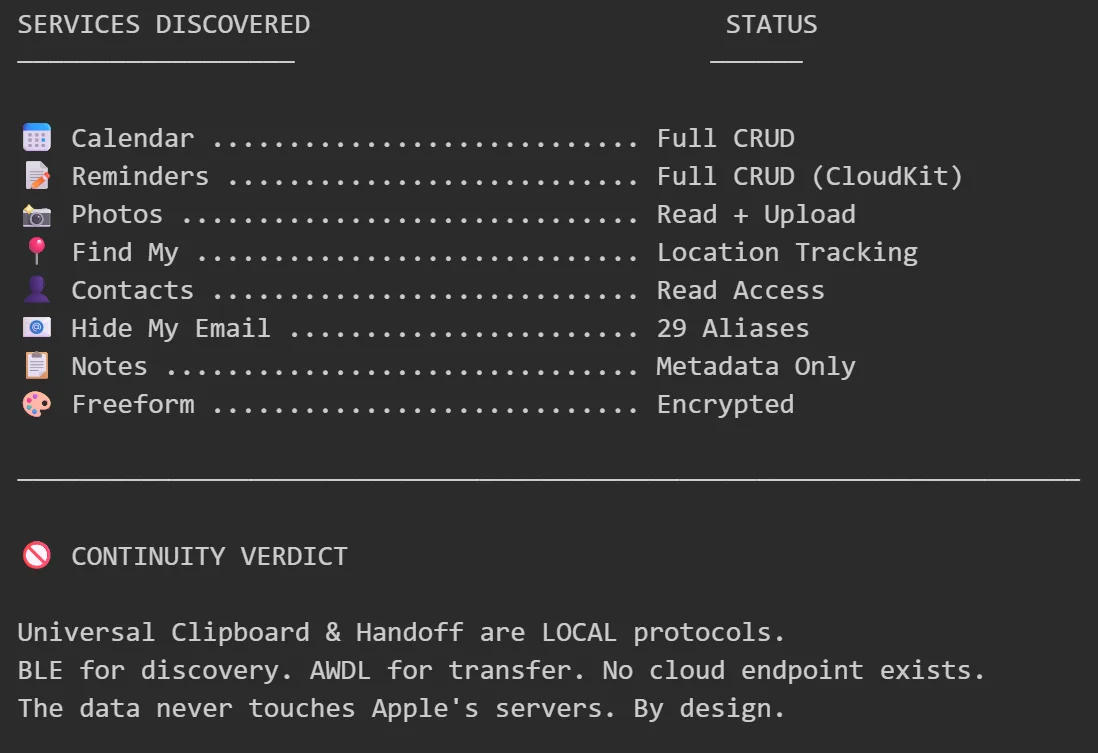
Continuity isn’t a cloud service. It’s a local mesh network protocol.
- BLE for discovery (Bluetooth Low Energy)
- AWDL for data transfer (Apple Wireless Direct Link — peer-to-peer WiFi)
- iCloud only syncs encryption keys
The data never touches Apple’s servers. By design. For privacy.
You can’t access Universal Clipboard via API because there’s no cloud endpoint TO access. The clipboard data goes directly from your phone to your laptop over local radio.
It’s elegant. And it means what I wanted is architecturally impossible.
What I Built
From this exploration:
Working tools:
- Full Reminders CRUD via CloudKit (read, create, update, delete, complete)
- Calendar event management via CalDAV
- Find My device location tracking
- Photo album access and upload
- Hide My Email alias listing
Documentation:
- Complete iCloud service map
- PCS token gating system
- GSA authentication flow
- APNs connection process
- BLE Continuity message formats
Understanding:
- Why Apple built it this way
- Where the real boundaries are
- What’s possible vs. what’s architecturally blocked
Reflections
I didn’t “hack” Apple. I used my own credentials to access my own data through undocumented but legitimate paths. The APIs exist. Apple uses them themself. They just don’t publicize them because they want you using their apps.
The walled garden is real. But you can’t have walls without doors… sometimes its about knowing where to look.
Some doors are locked for good reasons. Health data staying on-device is a feature, not a limitation. End-to-end encryption means even Apple can’t read your messages.
Other doors are locked because Apple likes control. There’s no technical reason Reminders can’t have a public API. They just… don’t offer one.
So I made my own.
Now What?
The code works. The research is documented. Now what?
Maybe a clean SDK that others can use. Maybe contribute to existing projects. Maybe just a blog post (this one) so others don’t have to map the maze themselves.
Truth be hold I don’t really know. I just wanted to toy around with it.
Research conducted on personal account with personal data. No security vulnerabilities exploited. Apple’s authentication model worked EXACTLY as designed. I just learned how it’s designed.